Lesson 5 of 13 Module 5
Ten Creative Formats
Ten original copy-and-adapt prompt recipes.
Join free to unlock all 13 lessons
Join AI Accelerator and get instant access to every coaching module, plus one short AI tip in your inbox each week.
Choose the format that matches the video, not the one with the most visual effects. Every recipe below is original and editable. Replace bracketed fields, attach the authentic photo or product reference, then run the quality check in Module 6.
1. High-Emotion Reaction
Best for a surprising revelation, opinion, challenge, or genuine emotional moment. The expression must be believable and relevant.
Create a striking editorial YouTube thumbnail about [SURPRISING EVENT]. Preserve the real reference photo of [CREATOR] and their recognizable identity. Place the creator at [LEFT/RIGHT] with a natural [REACTION] toward one dominant [EVIDENCE/OBJECT]. Use dramatic but realistic light and a clean contrasting background. Add only the exact 3–5-word caption “[HOOK]” in huge, mobile-readable type. Make the emotional connection visible in one second. No fabricated reactions, arrows, extra faces, or sensational imagery unrelated to the video.
2. Step-by-Step Tutorial
Best for a concrete process with a finished outcome that viewers want to achieve.
Design a high-clarity tutorial thumbnail for “[VIDEO TITLE].” Use the authentic [CREATOR] photo and one large, legible visual of the actual [FINISHED RESULT]. Establish a clean path from [STARTING PROBLEM] to [OUTCOME] through composition and lighting, not a cluttered process diagram. Add exactly “[HOOK]” in large display typography. Use [BRAND PALETTE], strong depth separation, and one unmistakable focal point. Preserve all authentic interface details; do not invent features or show unreadable walls of text.
3. Product Review
Best when the question is whether a real tool, product, or service is worth using.
Produce a premium editorial thumbnail for an honest review of [PRODUCT]. Keep the supplied product photo visually accurate and put it beside the real [REVIEWER] photo. Express a truthful verdict through [EXPRESSION/COMPARATIVE VISUAL] without faking ratings. Use one restrained dramatic light treatment and a background tied to the category. Render the exact hook “[HOOK]” in large type. Product and reviewer must remain recognizable on mobile. Avoid counterfeit branding, extra products, invented star ratings, or unreadable labels.
4. Product Comparison
Best for a real A-versus-B decision, not for a tutorial that simply mentions two tools.
Create an original two-choice thumbnail comparing [A] and [B]. Keep both supplied product references faithful and similar in visual weight. Separate them through purposeful light and color rather than a generic thick VS bar. Feature the authentic [CREATOR] only if their reaction clarifies the decision. The exact caption is “[HOOK].” Make the primary comparison dimension [PRICE/SPEED/RESULT] obvious in one glance, but do not invent measured values. Maintain clean balance and mobile legibility.
5. Before and After
Best when the transformation is real, visible, and comparable.
Design a believable before-and-after thumbnail for [SUBJECT]. Use two authentic source images with matching viewpoints. The left shows [BEFORE STATE] and the right [AFTER STATE]. Make the transformation understandable through visual contrast and one subtle transition treatment. Add the exact headline “[HOOK].” Preserve physical reality and accurate proportions. Do not manufacture an outcome, change the person's identity, or exaggerate the difference beyond supplied evidence.
6. Mystery and Storytelling
Best when a real question creates an information gap and the video supplies the answer.
Create a cinematic, restrained thumbnail for [TRUE STORY OR QUESTION]. Feature [PERSON/OBJECT/SCENE] as one large focal point, while a single partially revealed [CLUE] creates curiosity. Use deliberate shadows and realistic atmospheric depth. Add only “[HOOK]” in distinctive editorial typography. Keep the scene credible, intelligible, and compelling at mobile size. No fabricated evidence, false danger, sensational horror effects, or irrelevant question-mark clutter.
7. News and Commentary
Best for a timely, verified change with a clear consequence for the audience.
Design a sharp editorial thumbnail about the verified update [NEWS EVENT]. Make the real affected [PERSON/PRODUCT/DOCUMENT] dominant. Show one accurate visual representation of the change [CONSEQUENCE], using a controlled high-contrast palette. Use exact text “[HOOK]” and the authentic [COMMENTATOR] image only if it improves understanding. The composition should communicate what changed immediately. Never fabricate official notices, logos, quotes, or dramatic outcomes.
8. Gaming and Challenge
Best for a recognizable game, difficult moment, rare reward, or challenge.
Create an energetic but readable gaming thumbnail for [GAME/CHALLENGE]. Use authentic footage or approved character imagery to show [PLAYER] in relation to one large [BOSS/OBSTACLE/REWARD]. Convey action with an intentional diagonal composition, strong light separation, and clean motion cues. Place the exact short headline “[HOOK]” where it reads at a glance. Do not copy existing game cover art, invent items, add visual noise, or distort the player's face.
9. Business, Money, and Finance
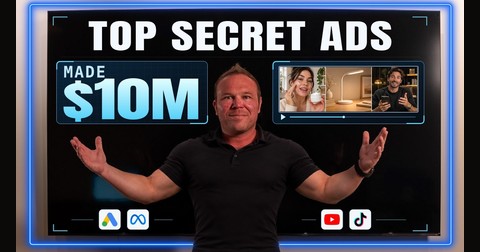
Best for a credible outcome, a tested strategy, and entrepreneur-led education. This is the foundation for Brad's Search Breakthrough thumbnail.
Create a premium business thumbnail for [VIDEO TITLE] using the exact real photograph of [FOUNDER]. The main proof is [VERIFIED RESULT], visually enormous and readable before anything else. Connect that result to one relevant [PLATFORM/TOOL/SCREEN] using an original, cohesive visual metaphor. Place the exact caption “[HOOK]” in bespoke display typography, with authentic facial features and realistic professional lighting. Use a distinctive [PALETTE] unlike the competitor grid. No fake bank balances, invented screenshots, luxury clichés, or extra copy.
10. Food and Recipe
Best when the food itself is the strongest reason to click.
Design a premium food thumbnail for [RECIPE/RESTAURANT EXPERIENCE]. Treat the supplied real dish photograph as unchangeable product evidence: keep plating, ingredients, portions, and appearance intact. Enhance only photographic light, depth, and color. Make the dish the visual hero, with the authentic [CHEF/HOST] only if useful. Add “[HOOK]” as a short readable headline. Aim for appetizing, believable restaurant photography. No invented garnish, fake steam, plastic food, extra dishes, or crowded stickers.
Format selection drill
Choose a format by the evidence your video contains: result → Business; process → Tutorial; genuine surprise → Reaction; choice → Comparison; real change → Before/After; question → Mystery; verified announcement → News; gameplay → Gaming; tangible product judgment → Review; food experience → Food.
Questions and comments
Stuck on something? Ask your question here. Brad and the community reply.
Loading comments...
No questions yet. Be the first to ask.